The Inner Workings Of A Coders Brain
Litecoin Miner Status
| Latest Version |
|---|
| Current Version: 1.0.0 (For Windows XP (SP3) & Above) Release Date: April 15th, 2013 Download Link (1.62Mb) |
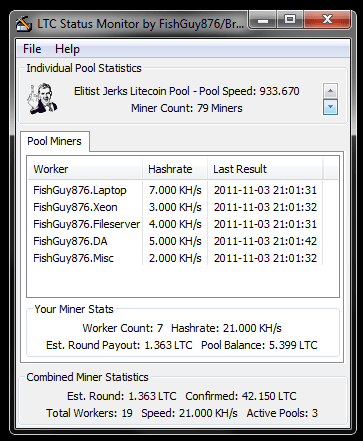 Litecoin Miner status is a small tool designed to monitor Litecoin mining across multiple pools. It analyzes the pool & worker data and provides you with an easy view of your mining status across each pool. Know at a glance just how much coin you have mined, or are due to receive, combined across all supported mining pools! The app does not do any mining work, it simply monitors the pools that you tell it to.
The main display interface is split into 3 pieces. The top part is a “pool ticker” that cycles through the supported mining pools, showing you the current overall stats of that individual pool such as it’s overall mining speed, and the number of individual miners currently working there (and their combined KH/s speed) along with other details. The middle field view shows the miners you have active in that specific pool (If any) and what your miners are currently doing there in terms of speed and LTC earnings. The bottom view is an overall view of your current mining summary across all of the supported pools, allowing you see quickly how much you have earned in total, or are expected to earn. No more having to manually calculate it by checking each pool website!
This tool is beerware. If you find it useful, please make a small donation to the author. You can donate LTC to me at LXWxRn8jNAj3PoKB4qcKMiePvshBrHjEo7 or you can donate BTC to 15s2vduLZSBUYDHPANgXVC9DPKz6BesZLj All donations are appreciated and support development of the application 🙂
Getting Started
Download and install the latest version of the program from the link at the very top of this page. This will install the program and the necessary files to run it. Once installed, double-click the icon from your desktop, or launch it from your Start Menu. A window similar to the above screenshot will appear. Upon launch, it will immediately begin to receive data from the supported pools unless configured otherwise.
Setting Up Pools
Pools are set up from the preferences screen. Click File -> Options to see the current supported pools. Each supported pool has an area to enter the API key for the pool. This is a special code that is taken from your account page on the pool. Paste in the code carefully, making sure not to add any extra spaces or characters when doing so. When you have entered all the API key’s you wish to use, you can click Save. The pools will refresh in the next cycle, and any active workers you have in the pool(s) will display in the window. If you continue to see no workers, and you are actively mining, check the API key is entered correctly.
Supported Mining Pools
As of this moment, the following Litecoin mining pools are currently supported:
- Pool-X ( http://pool-x.eu )
- LiteCoinPool PPS ( http://www.litecoinpool.org )
- Give-Me-LTC ( http://give-me-ltc.com )
- Netcode Illuminati ( http://www.netcodepool.org )
- We-Mine-LTC ( http://www.wemineltc.com )
- LiteBonk ( http://litebonk.com )
- SuprNova ( http://suprnova.cc/ )
- Mining Foreman ( http://mining-foreman.org )
- CoinPool ( http://coinpool.net )
As more pools are created they will be added. Pool owners can contact me directly with their info if they would like to see their pools added. Many thanks to the pool operators who have already donated to the program.
Additional Options
The same screen has some additional options. Setting a time (in seconds) in the Update Interval box will change how frequent the app will check the various pools for new information. This cannot be anything lower than 30 seconds (to stop pool operators from being hammered with requests).
To disable individual pool’s from being checked, simply un-check the “Use?” box next to the API key. Once saved, no new data will be pulled for that pool. If data already exists, it will stay in memory until the program is restarted. You should uncheck pools you do not wish to monitor, to keep the time needed to refresh data to a minimum.
FAQ
Q. I can’t see the window, how can I get it back?
A. Double click the pick-axe icon in the notification tray at any time, and the window will be brought to the front view. This should be next to your system clock.
Q. Can I quickly visit the website of any pool?
A. Yes. Just double-click the icon of the pool with the mouse and you will be taken to the website.
Q. Will this be released on any other system?
A. When I get a little further along (and free up some spare time) I will eventually port it to Linux and Mac.
Q. I am a pool owner and want to get my pool listed in the application. How can I do that?
A. Contact me at the address below with information for your pool. Your pool must support JSON reporting. If you pool is a vanilla mmcfe-based pool it will automatically be compatible with the right details. If the pool uses custom JSON, it can still be added with some extra work. Pool owners who donate to support development will get added to the application.
Reporting Problems
If you find any bugs, problems, or wish to suggest new features you can reach me via email at andy@andykellett.com or you can leave public comments at the bottom of this page. Enjoy!
Version History
V1.0.0 (Released 4/15/2013)
- Removed OzCoin & Elitist Jerks (both pools have now shut down for mining)
- Fixed several crashes in Windows XP, and Windows 7.
- New interface changes, tweaks & fixes.
- Several other minor bugfixes.
- Added support for the following new pools:
Give-Me-LTC ( http://give-me-ltc.com )
Netcode Illuminati ( http://www.netcodepool.org )
We-Mine-LTC ( http://www.wemineltc.com )
LiteBonk ( http://litebonk.com )
SuprNova ( http://suprnova.cc/ )
Mining Foreman ( http://mining-foreman.org )
CoinPool ( http://coinpool.net )
V0.6.1 (Released 1/4/2011)
- Fixed the pool address for Elitist Jerks.
V0.6.0 (Released 12/2/2011)
- New Pool Added: LiteCoinPool.org (PPS Litecoin Pool – http://www.litecoinpool.org )
- Modified some interface strings.
- Increased the time between automatic display switching by request.
- Timer now correctly reset when manually switching pool info being displayed.
- Stats can now be updated via the menu. Quit has also been added.
- Changed dontaion address (old one was/is spammed with transaction dust)
- Small changes & Bugfixes.
V0.5.2 (Released 11/18/2011)
- Updated JSON code to work with OzCoin.
V0.5.1 (Released 11/03/2011)
- Modified the icons for PoolX & OzCoin pools.
- Improved some of the pool logic when the app starts.
- Fixed some minor bugs.
V0.5.0 (Released 11/03/2011)
- Initial Release to Public.
[…] October 2012). Litecoin Miner Status. FishGuy876′s Blog. Retrieved April 27 […]
I was trying to use this for my Netcode Illuminati. I keyed-in my API key but it return nothing.
Do you have any idea how to solve it?
Hello, i was wondering if you could add http://ltc.mining4all.eu to you pool list,
Thanks in Avance
Greetz
ah, anyway to see the source? just interested in seeing how you decentralized json.. i almost killed myseld attempting in vb2010
can you allow users to enter their own pool info in the next version?
Hi,
Yes, the next major update will allow something along these lines (theres loads of mmcfe-based pools now that just magically work), im also starting on the Android client soon which wil also allow the same.
[…] Litecoin Miner Status […]
Hi,
Yes, the IP has changed. I will update later tonight and post a new version. Thanks.
Ahh, looks like it’s because their IP has changed.
LTC Miner Status is currently not displaying any stats for EJPool. Not sure if this applies to other pools.
Hi, New version of the tool has been uploaded and is available for download from the page. Thanks!
[…] The Inner Workings Of A Coders Brain HomeDiscographyBend File PrinterBFP HistoryFlexIO ClassicLitecoin Miner StatusNOW!RFCPool Miner StatusZine #14AboutAmiga StuffExtreme AMOS #3CNC Projects/HardwareCNC Bender […]
Hi, can you add Burnside’s mining pool (ltc.kattare.com)? or make this configurable for advance users ?